mirror of
https://github.com/silenceper/wechat.git
synced 2026-02-07 06:02:26 +08:00

145 lines
4.7 KiB
Markdown
145 lines
4.7 KiB
Markdown
# 云开发存储:实现留言本附件上传
|
||
## API说明
|
||
官方文档:[微信云开发存储文档](https://developers.weixin.qq.com/minigame/dev/wxcloud/reference-http-api/storage/),主要提供了三个API(上传,下载,删除),可以先分别看下参数
|
||
|
||
在这一节中主要利用到了sdk中的附件上传和下载的方法,方法如下:
|
||
```go
|
||
func (tcb *Tcb) UploadFile(env, path string) (*UploadFileRes, error) {
|
||
func (tcb *Tcb) BatchDownloadFile(env string, fileList []*DownloadFile) (*BatchDownloadFileRes, error) {
|
||
```
|
||
|
||
返回对应的返回结果在这里可以查看,[UploadFileRes](https://pkg.go.dev/github.com/silenceper/wechat/tcb?tab=doc#UploadFileRes),[BatchDownloadFileRes](https://pkg.go.dev/github.com/silenceper/wechat/tcb?tab=doc#BatchDownloadFileRes)
|
||
|
||
<a name="264b81c5"></a>
|
||
## 接收附件上传内容
|
||
1、保存index.html中form表单中使用的是post方法并且enctype为 `multipart/form-data` :
|
||
|
||
```html
|
||
<form action="/feedback" method="post" enctype="multipart/form-data">
|
||
```
|
||
2、在main.go中的feedback方法中获取上传的文件
|
||
|
||
```go
|
||
//2、文件上传
|
||
fileHeader, err := c.FormFile("file")
|
||
if err != nil && err != http.ErrMissingFile {
|
||
showError(c, err)
|
||
return
|
||
}
|
||
```
|
||
|
||
<a name="186268da"></a>
|
||
## 将附件保存在云开发中
|
||
在feedbackService中创建 `UploadFile` 方法,调用sdk中文件上传方法实现对文件的上传:<br />UploadFile 第一个参数为云开发环境,第二个参数为需要附件需要保存的路径
|
||
> 注意,这里path应该为相对路径。不能为绝对路径比如 /guestbook 应该为 guestbook 否则会报错。
|
||
|
||
|
||
```go
|
||
|
||
//UploadFile 上传文件
|
||
func (svc *FeedbackService) UploadFile(path string, file io.Reader) (string, error) {
|
||
//获取文件上传链接
|
||
uploadRes, err := getTcb().UploadFile(getConfig().TcbEnv, path)
|
||
if err != nil {
|
||
return "", err
|
||
}
|
||
|
||
data := make(map[string]io.Reader)
|
||
data["key"] = strings.NewReader(path)
|
||
data["Signature"] = strings.NewReader(uploadRes.Authorization)
|
||
data["x-cos-security-token"] = strings.NewReader(uploadRes.Token)
|
||
data["x-cos-meta-fileid"] = strings.NewReader(uploadRes.CosFileID)
|
||
data["file"] = file
|
||
|
||
//上传文件
|
||
_, err = goutils.PostFormWithFile(&http.Client{}, uploadRes.URL, data)
|
||
return uploadRes.FileID, err
|
||
}
|
||
```
|
||
|
||
其中 `PostFormWithFile` 方法是对 `mime/multipart` 方法的一个封装,用于将附件内容上传到指定的url中,在 `github.com/silenceper/goutils` 包中。
|
||
|
||
并在main.go中feedback方法调用并将返回的field和Filename保存在db中
|
||
|
||
```go
|
||
//2、文件上传
|
||
fileHeader, err := c.FormFile("file")
|
||
if err != nil && err != http.ErrMissingFile {
|
||
showError(c, err)
|
||
return
|
||
}
|
||
feedbackService := NewFeedbackService()
|
||
if fileHeader != nil {
|
||
path := fmt.Sprintf("guestbook/%s", fileHeader.Filename)
|
||
file, err := fileHeader.Open()
|
||
if err != nil {
|
||
showError(c, err)
|
||
return
|
||
}
|
||
|
||
fileID, err := feedbackService.UploadFile(path, file)
|
||
if err != nil {
|
||
showError(c, err)
|
||
return
|
||
}
|
||
feedback.FilePath = fileHeader.Filename
|
||
feedback.FileID = fileID
|
||
}
|
||
```
|
||
|
||
最终附件可以在index方法通过数据库查询在html中展示出来
|
||
|
||
<a name="786a132e"></a>
|
||
## 附件下载
|
||
这里创建一个单独的路由,用于对附件进行下载,通过在get参数中传入fileId,定位到附件,并打开附件路径:
|
||
|
||
```go
|
||
r.GET("/file", downloadFile)
|
||
```
|
||
|
||
```go
|
||
//附件下载
|
||
func downloadFile(c *gin.Context) {
|
||
fileID := c.Query("id")
|
||
if fileID == "" {
|
||
showError(c, fmt.Errorf("fileID为空"))
|
||
return
|
||
}
|
||
downLoadURL, err := NewFeedbackService().DownloadFile(fileID)
|
||
if err != nil {
|
||
showError(c, err)
|
||
return
|
||
}
|
||
c.Redirect(http.StatusMovedPermanently, downLoadURL)
|
||
}
|
||
```
|
||
|
||
在feedbackService中创建DownloadFile方法,返回真实下载路径,并跳转:
|
||
|
||
```go
|
||
|
||
//DownloadFile 获取下载链接
|
||
func (svc *FeedbackService) DownloadFile(id string) (string, error) {
|
||
files := []*tcb.DownloadFile{&tcb.DownloadFile{
|
||
FileID: id,
|
||
MaxAge: 100,
|
||
}}
|
||
res, err := getTcb().BatchDownloadFile(getConfig().TcbEnv, files)
|
||
if err != nil {
|
||
return "", err
|
||
}
|
||
if len(res.FileList) >= 1 {
|
||
return res.FileList[0].DownloadURL, nil
|
||
}
|
||
return "", nil
|
||
}
|
||
```
|
||
|
||
这里BatchDownloadFile方法第一个参数是云开发环境,第二个参数接收的 `tcb.DownloadFile` 数组,指定fileID和下载链接的有效期。
|
||
|
||
最终完成的效果如下:<br />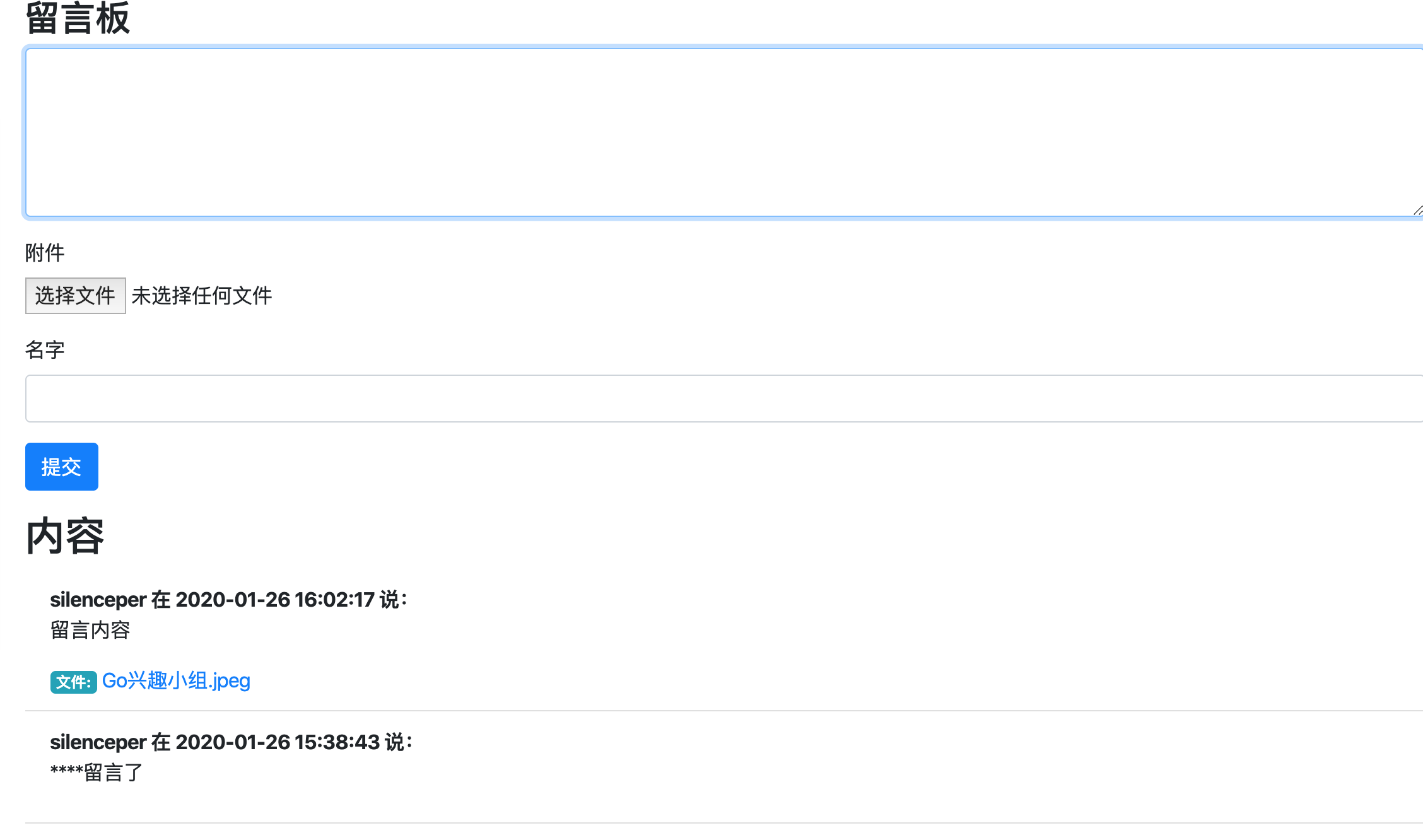
|
||
|
||
|
||
本文中所有代码都上传在 [https://github.com/go-demo/guestbook](https://github.com/go-demo/guestbook)
|
||
|