mirror of
https://github.com/silenceper/wechat.git
synced 2026-02-04 21:02:25 +08:00
Compare commits
29 Commits
| Author | SHA1 | Date | |
|---|---|---|---|

|
05e23e0d88 | ||
|
|
6279dadd29 | ||
|
|
a357c82080 | ||
|
|
ae271960e2 | ||
|
|
45522f003f | ||
|
|
a264ce4266 | ||
|
|
3c881e3885 | ||
|
|
3740bb55c3 | ||
|
|
c42d799367 | ||
|
|
798c5b081c | ||
|
|
491ee80136 | ||
|
|
a54b03a918 | ||
|
|
eec3233134 | ||
|
|
587ce04b5f | ||
|
|
ada9c1ff61 | ||

|
9e58e097cb | ||
|
|
8b6147c3ec | ||

|
0071852c75 | ||
|
|
f4491193cb | ||
|
|
576a898c0f | ||
|
|
76fde58ad9 | ||
|
|
903dadc260 | ||
|
|
1efbf27bde | ||
|
|
99a2eb659c | ||
|
|
9b06954b10 | ||
|
|
431f7d3a9f | ||
|
|
8e24b47a70 | ||
|
|
83bd282760 | ||

|
bf167d959c |
@@ -4,7 +4,6 @@ go:
|
||||
- 1.13.x
|
||||
- 1.12.x
|
||||
- 1.11.x
|
||||
- 1.10.x
|
||||
|
||||
services:
|
||||
- memcached
|
||||
|
||||
@@ -3,7 +3,6 @@
|
||||
[](https://goreportcard.com/report/github.com/silenceper/wechat)
|
||||
[](http://godoc.org/github.com/silenceper/wechat)
|
||||
|
||||
|
||||
使用Golang开发的微信SDK,简单、易用。
|
||||
|
||||
## 快速开始
|
||||
|
||||
53
cloudbase/README.md
Normal file
53
cloudbase/README.md
Normal file
@@ -0,0 +1,53 @@
|
||||
# 小程序-云开发 SDK
|
||||
|
||||
[云开发(CloudBase)](https://www.cloudbase.net/)是基于Serverless架构构建的一站式后端云服务,涵盖函数、数据库、存储、CDN等服务,免后端运维,支持小程序、Web和APP开发。 其中,小程序·云开发是微信和腾讯云联合推出的云端一体化解决方案,基于云开发可以免鉴权调用微信所有开放能力,在微信开发者工具中即可开通使用。
|
||||
|
||||
|
||||
|
||||
## 使用说明
|
||||
**引入依赖**
|
||||
>推荐使用go module 进行管理
|
||||
|
||||
```
|
||||
go get github.com/silenceper/wechat@v1.2.3
|
||||
```
|
||||
|
||||
**初始化配置**
|
||||
|
||||
```golang
|
||||
//使用memcache保存access_token,也可选择redis或自定义cache
|
||||
memCache=cache.NewMemcache("127.0.0.1:11211")
|
||||
|
||||
//配置小程序参数
|
||||
config := &wechat.Config{
|
||||
AppID: "your app id",
|
||||
AppSecret: "your app secret",
|
||||
Cache: memCache,
|
||||
}
|
||||
wc := wechat.NewWechat(config)
|
||||
wcTcb := wc.GetTcb()
|
||||
```
|
||||
|
||||
### 使用API
|
||||
|
||||
#### 触发云函数
|
||||
```golang
|
||||
res, err := wcTcb.InvokeCloudFunction("test-xxxx", "add", `{"a":1,"b":2}`)
|
||||
if err != nil {
|
||||
panic(err)
|
||||
}
|
||||
```
|
||||
|
||||
更多使用方法参考[pkg.go.dev](https://pkg.go.dev/github.com/silenceper/wechat@v1.2.3/tcb?tab=doc#Tcb)
|
||||
|
||||
## Demo
|
||||
### 使用wechat sdk开发一个留言板
|
||||
|
||||
这是一个使用wechat sdk来完成一个留言板的例子,使用到了云开发中的云函数,数据库,存储API:
|
||||
|
||||
- [起步:项目搭建](./guestbook-demo/start.md)
|
||||
- [数据库:调用云开发数据库实现文本保存](./guestbook-demo/database.md)
|
||||
- [云函数:调用云函数实现文本过滤](./guestbook-demo/cloudfunctions.md)
|
||||
- [云开发存储:实现留言本附件上传](./guestbook-demo/storage.md)
|
||||
|
||||
以上文中的所有代码都上传在 [https://github.com/go-demo/guestbook](https://github.com/go-demo/guestbook)
|
||||
100
cloudbase/guestbook-demo/cloudfunctions.md
Normal file
100
cloudbase/guestbook-demo/cloudfunctions.md
Normal file
@@ -0,0 +1,100 @@
|
||||
# 云开发存储:实现留言本附件上传
|
||||
## API说明
|
||||
云开发中云函数[文档说明](https://developers.weixin.qq.com/minigame/dev/wxcloud/reference-http-api/functions/),可以先阅读原始http api需要的参数以及说明
|
||||
|
||||
**基本流程:**
|
||||
|
||||
1. 创建云函数
|
||||
1. 通过微信开发者工具编写云函数
|
||||
1. 利用SDK实现云函数的调用
|
||||
|
||||
云函数调用主要使用到了sdk中 `InvokeCloudFunction` 方法的使用:
|
||||
|
||||
```go
|
||||
func (tcb *Tcb) InvokeCloudFunction(env, name, args string) (*InvokeCloudFunctionRes, error)
|
||||
```
|
||||
**参数说明:**<br />1、第一个参数为云开发的环境<br />2、第二个参数为云函数名称<br />3、第三个参数为需要传入的参数,这里传入一个json,方便在云函数中接收并处理,函数的返回值也是json<br />**<br />**返回结果:**
|
||||
|
||||
```go
|
||||
type InvokeCloudFunctionRes struct {
|
||||
util.CommonError
|
||||
RespData string `json:"resp_data"` //云函数返回的buffer
|
||||
}
|
||||
```
|
||||
|
||||
> util.CommonError :包含了errcode和errmsg字段,因为微信http api中的返回结果都会包含这两个字段,所以作为了一个公共的struct
|
||||
|
||||
|
||||
这里演示如何通过云函数实现对文本内容的过滤,比如对关键字的过滤。
|
||||
<a name="s4cYj"></a>
|
||||
## 创建一个云函数
|
||||
打开微信开发者工具,在cloudfunctions中创建一个filterText云函数:<br />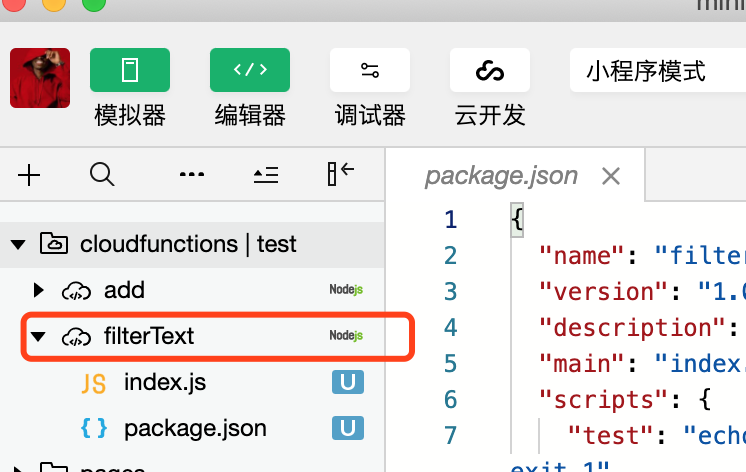
|
||||
|
||||
其中index.js文本内容实现了对关键字的替换,内容如下:
|
||||
|
||||
```javascript
|
||||
// 云函数入口文件
|
||||
//敏感词
|
||||
var keywords = ["色情"]
|
||||
|
||||
// 云函数入口函数
|
||||
exports.main = async(event, context) => {
|
||||
let {
|
||||
text
|
||||
} = event
|
||||
keywords.map(word => {
|
||||
let regExp = new RegExp(word, 'g')
|
||||
text = text.replace(regExp, "****")
|
||||
})
|
||||
return {
|
||||
text
|
||||
}
|
||||
}
|
||||
```
|
||||
|
||||
这里实现了对关键字 `色情` 替换为 `****` 。
|
||||
<a name="MIN25"></a>
|
||||
## 调用云函数
|
||||
|
||||
在feedbackService中创建FilterText函数实现对云函数的调用,传入原始文本内容,返回最终过滤之后的内容。
|
||||
|
||||
```go
|
||||
//FilterRes 过滤文件的结果
|
||||
type FilterRes struct {
|
||||
Text string `json:"text"`
|
||||
}
|
||||
|
||||
//FilterText 调用云函数过滤文本
|
||||
func (svc *FeedbackService) FilterText(text string) (string, error) {
|
||||
res, err := getTcb().InvokeCloudFunction(getConfig().TcbEnv, "filterText", fmt.Sprintf(`{"text":"%s"}`, text))
|
||||
//返回的是json
|
||||
filterRes := &FilterRes{}
|
||||
err = json.Unmarshal([]byte(res.RespData), filterRes)
|
||||
if err != nil {
|
||||
return "", nil
|
||||
}
|
||||
|
||||
return filterRes.Text, nil
|
||||
}
|
||||
```
|
||||
这里将云函数调用的返回值保存在FilterRes struct中。
|
||||
|
||||
最后再 feedbackService中的 `Save` 对Content内容进行替换:
|
||||
|
||||
```go
|
||||
//Save 保存内容
|
||||
func (svc *FeedbackService) Save(feedback *Feedback) error {
|
||||
.....
|
||||
//content 调用云函数过滤
|
||||
var err error
|
||||
feedback.Content, err = svc.FilterText(feedback.Content)
|
||||
if err != nil {
|
||||
return err
|
||||
}
|
||||
....
|
||||
}
|
||||
```
|
||||
|
||||
最终的效果如下,当我们输入了含有关键字的留言内容最终就会被替换为****:<br />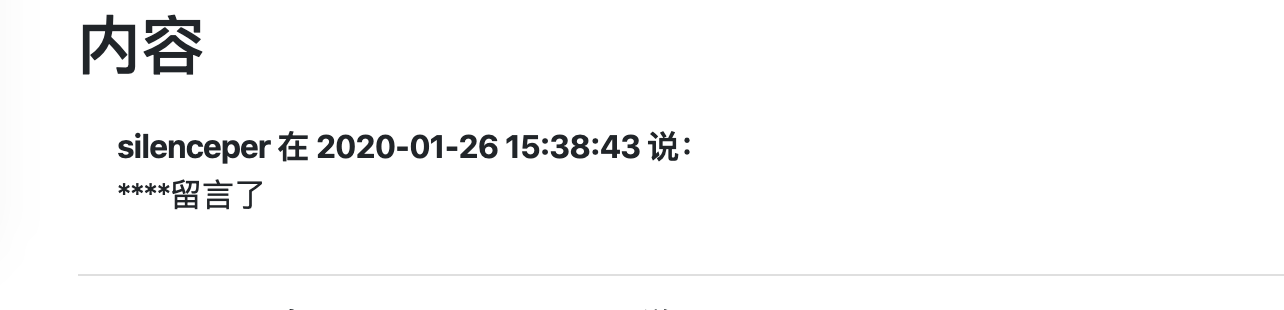
|
||||
|
||||
|
||||
306
cloudbase/guestbook-demo/database.md
Normal file
306
cloudbase/guestbook-demo/database.md
Normal file
@@ -0,0 +1,306 @@
|
||||
# 数据库:调用云开发数据库实现文本保存
|
||||
|
||||
在这一节,我们主要描述如何利用`wechat sdk`将留言的内容保存在云开发数据库中。
|
||||
|
||||
<a name="RjeGP"></a>
|
||||
## API说明
|
||||
参考微信云开发文档 [数据库篇](https://developers.weixin.qq.com/minigame/dev/wxcloud/reference-http-api/database/#%E6%95%B0%E6%8D%AE%E5%BA%93),可以先阅读其原始的api提供的方法和说明,在[SDK DOC](https://pkg.go.dev/github.com/silenceper/wechat/tcb?tab=doc#Tcb.DatabaseAdd)中都可以找到对应的方法以及参数。
|
||||
|
||||
主要利用到[SDK DOC](https://pkg.go.dev/github.com/silenceper/wechat/tcb?tab=doc#Tcb.DatabaseAdd)中的如下方法,其他方法可在文档中找到,sdk文档中以 `Database` 开头的方法即为数据库相关的方法调用。
|
||||
```go
|
||||
func (tcb *Tcb) DatabaseAdd(env, query string) (*DatabaseAddRes, error) //数据库内容保存
|
||||
func (tcb *Tcb) DatabaseCount(env, query string) (*DatabaseCountRes, error)//数据库计数
|
||||
func (tcb *Tcb) DatabaseQuery(env, query string) (*DatabaseQueryRes, error)//数据库内容查询
|
||||
```
|
||||
返回结果对应字段说明: [`DatabaseAddRes`](https://pkg.go.dev/github.com/silenceper/wechat/tcb?tab=doc#DatabaseAddRes) , [`DatabaseCountRes`](https://pkg.go.dev/github.com/silenceper/wechat/tcb?tab=doc#DatabaseCountRes) , [`DatabaseQueryRes`](https://pkg.go.dev/github.com/silenceper/wechat/tcb?tab=doc#DatabaseQueryRes)
|
||||
|
||||
<a name="VKuDQ"></a>
|
||||
## 包引入
|
||||
本例中引入的WeChat sdk版本为v1.2.3版本,通过如下方法引入
|
||||
```bash
|
||||
go get github.com/silenceper/wechat@v1.2.3
|
||||
```
|
||||
可以在go.mod文件中看到引入的包以及对应的版本:
|
||||
```go
|
||||
module github.com/go-demo/guestbook
|
||||
|
||||
go 1.13
|
||||
|
||||
require (
|
||||
github.com/gin-gonic/gin v1.5.0
|
||||
github.com/silenceper/wechat v1.2.3 // indirect
|
||||
)
|
||||
```
|
||||
|
||||
<a name="m7jnm"></a>
|
||||
## 保存至云开发数据库
|
||||
<a name="a095b5de"></a>
|
||||
### WeChat SDK配置
|
||||
为了方便在其他方法中调用<br />创建config.go用于解析云开发对应的配置参数,appkey,app_secret等:
|
||||
|
||||
```go
|
||||
package main
|
||||
|
||||
import (
|
||||
"io/ioutil"
|
||||
|
||||
"github.com/silenceper/wechat"
|
||||
"github.com/silenceper/wechat/cache"
|
||||
"github.com/silenceper/wechat/tcb"
|
||||
"gopkg.in/yaml.v2"
|
||||
)
|
||||
|
||||
//Config 配置信息
|
||||
type Config struct {
|
||||
TcbEnv string `yaml:"tcb_env"`
|
||||
AppID string `yaml:"app_id"`
|
||||
AppSecret string `yaml:"app_secret"`
|
||||
}
|
||||
|
||||
var cfg *Config
|
||||
var _ = getConfig()
|
||||
|
||||
//通过getConfig方法获取配置参数
|
||||
func getConfig() *Config {
|
||||
if cfg != nil {
|
||||
return cfg
|
||||
}
|
||||
data, err := ioutil.ReadFile("./config.yaml")
|
||||
if err != nil {
|
||||
panic(err)
|
||||
}
|
||||
cfg = &Config{}
|
||||
err = yaml.Unmarshal(data, cfg)
|
||||
if err != nil {
|
||||
panic(err)
|
||||
}
|
||||
return cfg
|
||||
}
|
||||
|
||||
var wechatTcb *tcb.Tcb
|
||||
var _ = getTcb()
|
||||
//通过getTcb获取wechat sdk的配置参数
|
||||
func getTcb() *tcb.Tcb {
|
||||
if wechatTcb != nil {
|
||||
return wechatTcb
|
||||
}
|
||||
memCache := cache.NewMemory()
|
||||
|
||||
//配置小程序参数
|
||||
config := &wechat.Config{
|
||||
AppID: getConfig().AppID,
|
||||
AppSecret: getConfig().AppSecret,
|
||||
Cache: memCache,
|
||||
}
|
||||
wc := wechat.NewWechat(config)
|
||||
wechatTcb = wc.GetTcb()
|
||||
return wechatTcb
|
||||
}
|
||||
```
|
||||
|
||||
其中config.yaml写入三个配置参数:
|
||||
|
||||
```yaml
|
||||
tcb_env: test-6ku2s //云开发环境
|
||||
app_id: xxxxxx //云开发appid
|
||||
app_secret: xxxxxxxxx //云开发对应的app secret
|
||||
```
|
||||
|
||||
<a name="VbDg9"></a>
|
||||
### 调用API
|
||||
为了方便在其他方法中方便调用sdk中的方法,这里新建一个 `feedbackService` struct,创建对应的save方法用于保存留言, `feedback.go` :
|
||||
|
||||
```go
|
||||
package main
|
||||
|
||||
import (
|
||||
"fmt"
|
||||
"time"
|
||||
)
|
||||
|
||||
//FeedbackService service
|
||||
type FeedbackService struct {
|
||||
}
|
||||
|
||||
//NewFeedbackService new
|
||||
func NewFeedbackService() *FeedbackService {
|
||||
return &FeedbackService{}
|
||||
}
|
||||
|
||||
//Feedback 留言记录
|
||||
type Feedback struct {
|
||||
Username string `form:"username",json:"username"`
|
||||
Content string `form:"content",json:"content"`
|
||||
FilePath string `json:"filePath"`//文件路径
|
||||
FileID string `json:"fileId"` //存放文件
|
||||
CreateTime string `json:"createTime"`
|
||||
}
|
||||
|
||||
func (svc *FeedbackService) Save(feedback *Feedback) error {
|
||||
if feedback.Username == "" || feedback.Content == "" {
|
||||
return fmt.Errorf("用户名或留言内容不能为空")
|
||||
}
|
||||
query := `db.collection(\"%s\").add({
|
||||
data: [{
|
||||
username: \"%s\",
|
||||
content: \"%s\",
|
||||
filePath: \"%s\",
|
||||
fileId: \"%s\",
|
||||
createTime: \"%s\",
|
||||
}]
|
||||
})`
|
||||
feedback.CreateTime = time.Now().Format("2006-01-02 15:04:05")
|
||||
query = fmt.Sprintf(query, "guestbook", feedback.Username, feedback.Content, feedback.FilePath, feedback.FileID, feedback.CreateTime)
|
||||
_, err := getTcb().DatabaseAdd(getConfig().TcbEnv, query)
|
||||
if err != nil {
|
||||
return err
|
||||
}
|
||||
return nil
|
||||
}
|
||||
```
|
||||
|
||||
其中对于数据库中的query语句可以参考[https://developers.weixin.qq.com/miniprogram/dev/wxcloud/guide/database/add.html](https://developers.weixin.qq.com/miniprogram/dev/wxcloud/guide/database/add.html)
|
||||
|
||||
这里调用 `DatabaseAdd` 方法实现内容的保存。
|
||||
|
||||
<a name="8db0f827"></a>
|
||||
## 接收表单提交内容
|
||||
将表单提交的内容提交到 `/feedback` 路由中,并创建 `feedback`方法接收表单提交的参数,
|
||||
|
||||
```go
|
||||
func main() {
|
||||
r := gin.Default()
|
||||
|
||||
//包含html模板
|
||||
r.LoadHTMLGlob("./template/*")
|
||||
//渲染留言页面
|
||||
r.GET("/",index)
|
||||
//提交留言
|
||||
r.POST("/feedback", feedback)
|
||||
|
||||
r.Run() // listen and serve on 0.0.0.0:8080 (for windows "localhost:8080")
|
||||
}
|
||||
```
|
||||
|
||||
其中feedback方法如下:
|
||||
|
||||
```go
|
||||
//接收提交的内容
|
||||
func feedback(c *gin.Context) {
|
||||
//1、接收提交参数
|
||||
feedback := &Feedback{}
|
||||
err := c.Bind(feedback)
|
||||
if err != nil {
|
||||
showError(c, err)
|
||||
return
|
||||
}
|
||||
feedbackService := NewFeedbackService()
|
||||
//保存内容
|
||||
err = feedbackService.Save(feedback)
|
||||
if err != nil {
|
||||
showError(c, err)
|
||||
return
|
||||
}
|
||||
|
||||
c.Redirect(http.StatusMovedPermanently, "/")
|
||||
}
|
||||
```
|
||||
|
||||
这里通过c.Bind方法将form表单中的内容绑定到 `Feedback` stuct中,再通过调用feedbackService中的Save方法对文本内容进行保存。
|
||||
<a name="DlBj4"></a>
|
||||
## 展示留言内容
|
||||
留言内容的展示主要分为两步,一先从数据库展示出来,二是将留言内容展示在页面:<br />查询的sql语句为:
|
||||
```go
|
||||
db.collection("guestbook").orderBy('createTime','desc').skip(0).limit(10).get()
|
||||
```
|
||||
|
||||
在 `feedback.go` 中新增List方法,其中参数传入skip和limit参数用于分页
|
||||
|
||||
```go
|
||||
//List 文本列表
|
||||
func (svc *FeedbackService) List(skip, limit int) ([]*Feedback, error) {
|
||||
query := fmt.Sprintf("db.collection(\"guestbook\").orderBy('createTime','desc').skip(%d).limit(%d).get()", skip, limit)
|
||||
data, err := getTcb().DatabaseQuery(getConfig().TcbEnv, query)
|
||||
if err != nil {
|
||||
return nil, err
|
||||
}
|
||||
feedbacks := make([]*Feedback, 0, len(data.Data))
|
||||
for _, v := range data.Data {
|
||||
feedbackItem := &Feedback{}
|
||||
err := json.Unmarshal([]byte(v), feedbackItem)
|
||||
if err != nil {
|
||||
return nil, err
|
||||
}
|
||||
feedbacks = append(feedbacks, feedbackItem)
|
||||
|
||||
}
|
||||
//fmt.Println(data.Pager)
|
||||
return feedbacks, nil
|
||||
}
|
||||
```
|
||||
|
||||
这里主要调用 `DatabaseQuery` 方法对db进行查询。
|
||||
|
||||
在main.go中的index方法在从数据中获取的数据取出并渲染在index.html中:
|
||||
|
||||
```go
|
||||
//首页
|
||||
func index(c *gin.Context) {
|
||||
page := c.Query("page")
|
||||
//获取记录数量
|
||||
feedbackService := NewFeedbackService()
|
||||
count, err := feedbackService.Count()
|
||||
if err != nil {
|
||||
showError(c, err)
|
||||
return
|
||||
}
|
||||
limit := 10
|
||||
totalPage := math.Ceil(float64(count) / float64(limit))
|
||||
totalPageInt := int(totalPage)
|
||||
pageInt, _ := strconv.Atoi(page)
|
||||
if pageInt > totalPageInt {
|
||||
pageInt = totalPageInt
|
||||
}
|
||||
if pageInt < 1 {
|
||||
pageInt = 1
|
||||
}
|
||||
|
||||
//展示留言列表
|
||||
skip := (pageInt - 1) * limit
|
||||
list, err := feedbackService.List(skip, limit)
|
||||
if err != nil {
|
||||
showError(c, err)
|
||||
return
|
||||
}
|
||||
|
||||
c.HTML(http.StatusOK, "index.html", gin.H{
|
||||
"title": "留言板",
|
||||
"list": list,
|
||||
"prevPage": pageInt - 1,
|
||||
"nextPage": pageInt + 1,
|
||||
"page": pageInt,
|
||||
"totalPage": totalPageInt,
|
||||
})
|
||||
}
|
||||
```
|
||||
|
||||
其中index.html通过go template语法对内容进行渲染
|
||||
|
||||
```html
|
||||
<div class="list-group list-group-flush">
|
||||
{{range .list}}
|
||||
<div class="list-group-item">
|
||||
<div><span><b>{{.Username}} 在 {{.CreateTime}} 说:</b></span></div>
|
||||
<div><p>{{.Content}}</p></div>
|
||||
</div>
|
||||
{{end}}
|
||||
</div>
|
||||
<div>
|
||||
<span>第{{.page}}页</span>
|
||||
{{if gt .page 1}}<a href="/?page={{.prevPage}}">上一页</a>{{end}}
|
||||
{{if lt .page .totalPage}} <a href="/?page={{.nextPage}}">下一页</a>{{end}}
|
||||
</div>
|
||||
```
|
||||
|
||||
这样就实现了对文本内容的保存
|
||||
|
||||
185
cloudbase/guestbook-demo/start.md
Normal file
185
cloudbase/guestbook-demo/start.md
Normal file
@@ -0,0 +1,185 @@
|
||||
# 起步:项目搭建
|
||||
|
||||
<a name="8MeIi"></a>
|
||||
## 目标
|
||||
通过完成一个留言板应用来熟悉云开发中go sdk中的使用,主要分为以下三个内容
|
||||
|
||||
1. 如何利用云开发中的[数据库](https://developers.weixin.qq.com/minigame/dev/wxcloud/reference-http-api/database/#%E6%95%B0%E6%8D%AE%E5%BA%93)进行留言内容的保存
|
||||
1. 使用[云函数](https://developers.weixin.qq.com/minigame/dev/wxcloud/reference-http-api/functions/)进行文本内容的过滤
|
||||
1. 使用[云开发存储](https://developers.weixin.qq.com/minigame/dev/wxcloud/reference-http-api/storage/)能力进行附件的保存
|
||||
|
||||
<a name="Nq75E"></a>
|
||||
## 环境介绍
|
||||
<a name="Kxmk0"></a>
|
||||
### Golang 1.13
|
||||
项目中使用Golang 1.13版本进行开发,并且使用go module 进行依赖管理
|
||||
<a name="H0cFe"></a>
|
||||
### 编辑器:Goland
|
||||
代码编辑工具
|
||||
<a name="PsxLG"></a>
|
||||
### 热编译工具:Gowatch
|
||||
Go 程序热编译工具,提升开发效率<br />官网地址: [https://github.com/silenceper/gowatch](https://github.com/silenceper/gowatch)<br />**快速安装:**
|
||||
```basic
|
||||
go get -u github.com/silenceper/gowatch
|
||||
```
|
||||
|
||||
<a name="tNyRl"></a>
|
||||
### web开发框架-Gin
|
||||
一个web开发框架,方便快速构建一个web应用<br />官网: [https://github.com/gin-gonic/gin](https://github.com/gin-gonic/gin)
|
||||
<a name="MzLXD"></a>
|
||||
### Wechat SDK For Go
|
||||
使用Golang对微信公众号,小程序,云开发等API进行封装,使得Go项目中可以方便上手<br />官网: [https://github.com/silenceper/wechat/](https://github.com/silenceper/wechat/) <br />文档:[https://pkg.go.dev/github.com/silenceper/wechat/tcb?tab=doc](https://pkg.go.dev/github.com/silenceper/wechat/tcb?tab=doc)
|
||||
<a name="pNPPj"></a>
|
||||
### 云开发
|
||||
集成数据库,存储,云函数等功能的平台<br />使用文档:[https://developers.weixin.qq.com/miniprogram/dev/wxcloud/reference-http-api/](https://developers.weixin.qq.com/miniprogram/dev/wxcloud/reference-http-api/)<br />在开始开发前,请注册一个小程序获取 `app_id` , `app_secret`参数,并开启云开发功能。
|
||||
|
||||
<a name="qyAfI"></a>
|
||||
## 初始化项目
|
||||
> 本项目中使用go module进行依赖管理
|
||||
|
||||
在工作目录创建一个项目`guestbook`,并使用`go mod init github.com/go-demo/guestbook`进行初始化,后面接的是`import path`。
|
||||
|
||||
```bash
|
||||
mkdir guestbook
|
||||
cd guestbook
|
||||
go mod init github.com/go-demo/guestbook
|
||||
```
|
||||
|
||||
<a name="JvK7M"></a>
|
||||
### 编写main.go文件
|
||||
使用goland编辑器中打开这个项目,并创建一个`main.go`文件,内容如下:
|
||||
|
||||
```go
|
||||
package main
|
||||
|
||||
import "github.com/gin-gonic/gin"
|
||||
|
||||
func main() {
|
||||
r := gin.Default()
|
||||
r.GET("/ping", func(c *gin.Context) {
|
||||
c.JSON(200, gin.H{
|
||||
"message": "pong",
|
||||
})
|
||||
})
|
||||
r.Run() // listen and serve on 0.0.0.0:8080
|
||||
}
|
||||
```
|
||||
|
||||
<a name="q2Vtn"></a>
|
||||
### 编译并运行
|
||||
我们可以在Goland编辑器中Terminal面板中进入项目目录,使用`gowatch`命令对该项目进行热编译,看到图片中的log输出表示已经启动成功:
|
||||
> gowatch会监听项目中文件的变化,当进行变化后,对项目进行build 和run,这样我们就可以在一边修改代码一边对项目进行编译及时发现错误,是不是效率提升了呢 :>
|
||||
|
||||
|
||||
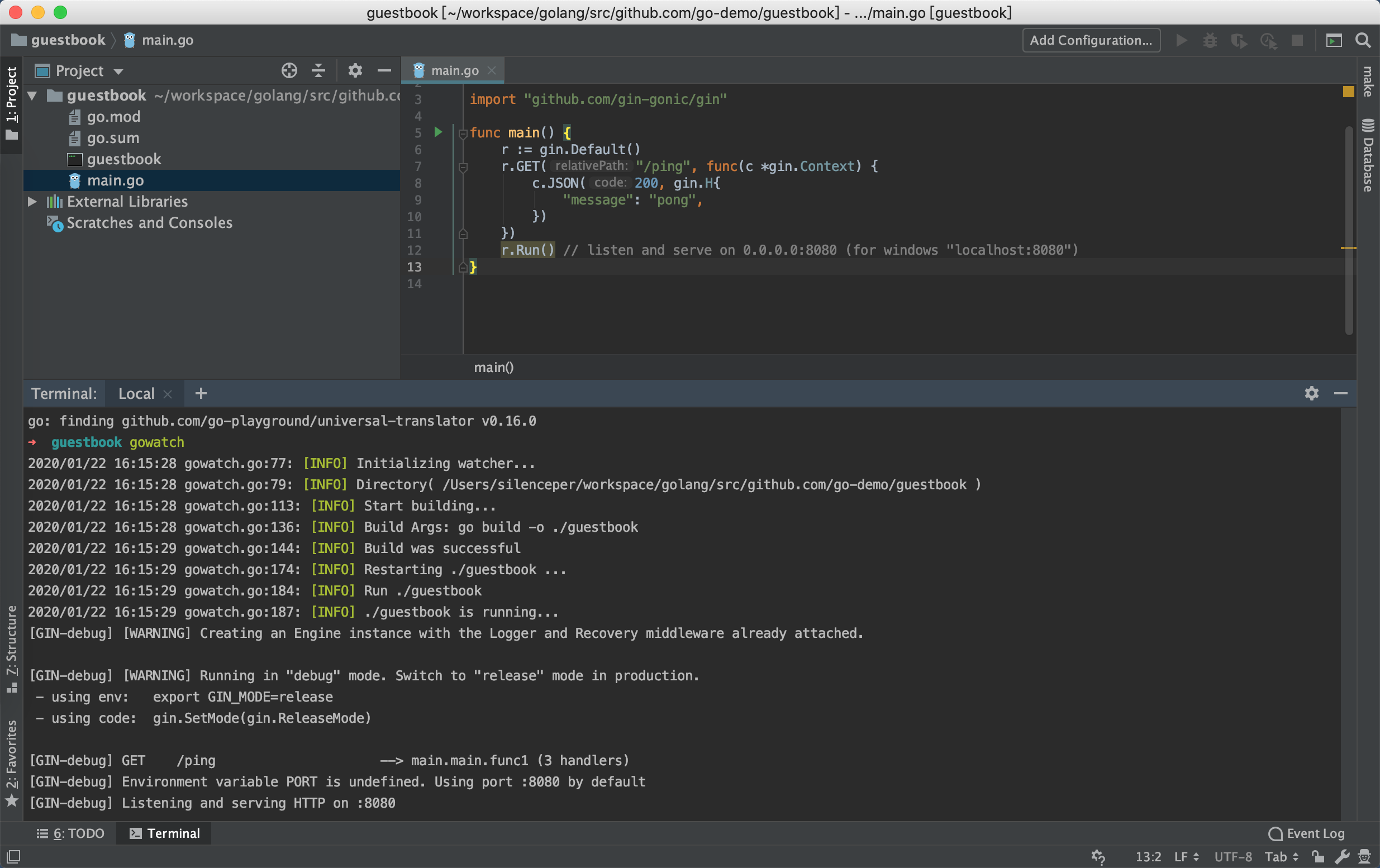<br />(初次build会通过go module自动下载依赖,请注意开启go module功能)
|
||||
|
||||
我们通过访问`127.0.0.1:8080/ping`就可以看到页面上输出`{"message":"pong"}`说明服务启动成功。
|
||||
|
||||
<a name="yXtGW"></a>
|
||||
## 渲染留言页面
|
||||
我们可以先规划我们的UI是怎么样子?
|
||||
|
||||
包含两部分:
|
||||
|
||||
- 留言框:包含留言内容,附件上传,用户名,提交按钮
|
||||
- 内容展示:展示留言内容,附件以及留言者和留言日期
|
||||
|
||||
界面展示如下:<br />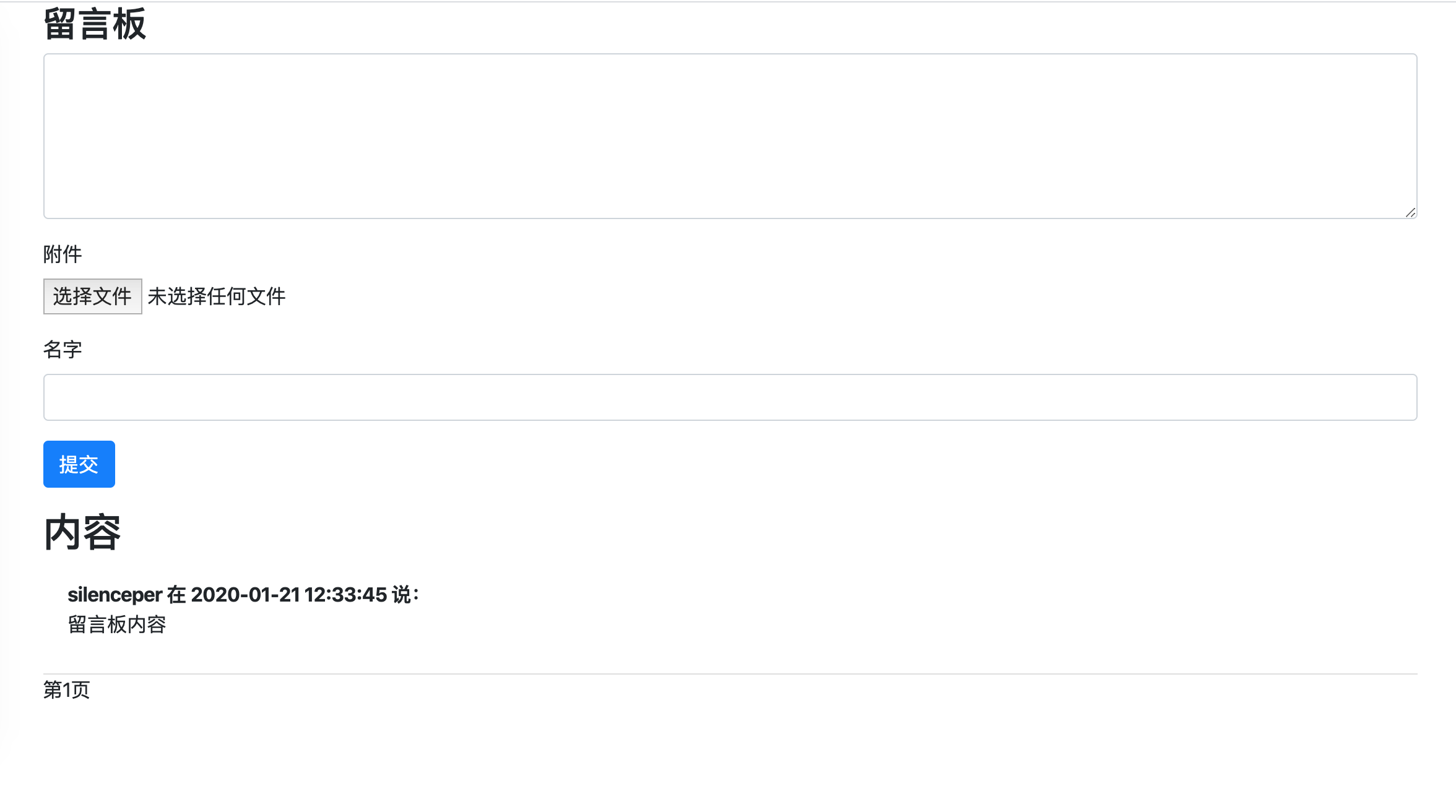
|
||||
<a name="2vKHj"></a>
|
||||
### 创建模板文件
|
||||
对应的html代码如下,我们保存在项目中的template/index.html文件中:
|
||||
|
||||
```html
|
||||
<!doctype html>
|
||||
<html>
|
||||
<head>
|
||||
<title>留言板</title>
|
||||
<link rel="stylesheet" href="https://cdn.jsdelivr.net/npm/bootstrap@4.4.1/dist/css/bootstrap.min.css"
|
||||
integrity="sha384-Vkoo8x4CGsO3+Hhxv8T/Q5PaXtkKtu6ug5TOeNV6gBiFeWPGFN9MuhOf23Q9Ifjh" crossorigin="anonymous">
|
||||
</head>
|
||||
<body class="container-md">
|
||||
<h3>留言板</h3>
|
||||
<div>
|
||||
<form action="/feedback" method="post" enctype="multipart/form-data">
|
||||
<div class="form-group">
|
||||
<textarea class="form-control" name="content" id="content" cols="50" rows="5"></textarea>
|
||||
</div>
|
||||
<div class="form-group">
|
||||
<label for="file">附件</label>
|
||||
<input type="file" class="form-control-file" name="file" id="">
|
||||
</div>
|
||||
<div class="form-group">
|
||||
<label for="username">名字</label>
|
||||
<input type="text" name="username" class="form-control"></div>
|
||||
<div class="form-group"><input type="submit" value="提交" class="btn btn-primary"></div>
|
||||
</form>
|
||||
<h2>内容</h2>
|
||||
<div class="list-group list-group-flush">
|
||||
<div class="list-group-item">
|
||||
<div><span><b>silenceper 在 2020-01-21 12:33:45 说:</b></span></div>
|
||||
<div><p>留言板内容</p></div>
|
||||
</div>
|
||||
</div>
|
||||
<div>
|
||||
<span>第1页</span>
|
||||
</div>
|
||||
</div>
|
||||
</body>
|
||||
</html>
|
||||
```
|
||||
|
||||
这里引入了bootstrap样式文件,不需要自己写太多前端样式了,出来的UI也不会太难看。
|
||||
|
||||
<a name="MLcML"></a>
|
||||
### 通过gin渲染模板
|
||||
我们想要通过访问`127.0.0.1:8080`直接访问到这个留言页面,main.go中代码如下:
|
||||
|
||||
```go
|
||||
package main
|
||||
|
||||
import (
|
||||
"net/http"
|
||||
|
||||
"github.com/gin-gonic/gin"
|
||||
)
|
||||
|
||||
func main() {
|
||||
r := gin.Default()
|
||||
|
||||
//包含html模板
|
||||
r.LoadHTMLGlob("./template/*")
|
||||
//渲染留言页面,GET请求,通过根路径可以直接访问
|
||||
//当路径匹配成功后,进入index访问进行处理
|
||||
r.GET("/",index)
|
||||
|
||||
|
||||
r.Run() // listen and serve on 0.0.0.0:8080
|
||||
}
|
||||
|
||||
//渲染留言板首页
|
||||
func index(c *gin.Context) {
|
||||
//返回200,并渲染index.html页面
|
||||
c.HTML(http.StatusOK,"index.html",gin.H{
|
||||
"title":"留言板",
|
||||
})
|
||||
}
|
||||
```
|
||||
|
||||
其中`r.LoadHTMLGlob("./template/*") `指定了html模板的位置,这样在使用进行`c.HTML`进行渲染的时候就知道到哪个位置进行查找了。
|
||||
|
||||
**c.HTML说明:**
|
||||
|
||||
- 第一个参数:http状态码
|
||||
- 第二个参数:需要渲染的模板
|
||||
- 第三个参数:需要传递的值(`gin.H`其实是一个`map[string]interface{}`的别名)
|
||||
|
||||
这里`c.HTML`渲染了`index.html`,并以`200`状态码输出,第三个参数`gin.H`,传入`key:value` ,就可以在`index.html`页面中使用go-template语法进行值的替换,语法格式:
|
||||
|
||||
`{{.title}}`
|
||||
|
||||
这里可以查阅gin文档:[如何进行html渲染](https://github.com/gin-gonic/gin#html-rendering)
|
||||
|
||||
<a name="XXc0s"></a>
|
||||
## 代码地址
|
||||
本文中所有代码都上传在 [https://github.com/go-demo/guestbook](https://github.com/go-demo/guestbook)
|
||||
|
||||
144
cloudbase/guestbook-demo/storage.md
Normal file
144
cloudbase/guestbook-demo/storage.md
Normal file
@@ -0,0 +1,144 @@
|
||||
# 云开发存储:实现留言本附件上传
|
||||
## API说明
|
||||
官方文档:[微信云开发存储文档](https://developers.weixin.qq.com/minigame/dev/wxcloud/reference-http-api/storage/),主要提供了三个API(上传,下载,删除),可以先分别看下参数
|
||||
|
||||
在这一节中主要利用到了sdk中的附件上传和下载的方法,方法如下:
|
||||
```go
|
||||
func (tcb *Tcb) UploadFile(env, path string) (*UploadFileRes, error) {
|
||||
func (tcb *Tcb) BatchDownloadFile(env string, fileList []*DownloadFile) (*BatchDownloadFileRes, error) {
|
||||
```
|
||||
|
||||
返回对应的返回结果在这里可以查看,[UploadFileRes](https://pkg.go.dev/github.com/silenceper/wechat/tcb?tab=doc#UploadFileRes),[BatchDownloadFileRes](https://pkg.go.dev/github.com/silenceper/wechat/tcb?tab=doc#BatchDownloadFileRes)
|
||||
|
||||
<a name="264b81c5"></a>
|
||||
## 接收附件上传内容
|
||||
1、保存index.html中form表单中使用的是post方法并且enctype为 `multipart/form-data` :
|
||||
|
||||
```html
|
||||
<form action="/feedback" method="post" enctype="multipart/form-data">
|
||||
```
|
||||
2、在main.go中的feedback方法中获取上传的文件
|
||||
|
||||
```go
|
||||
//2、文件上传
|
||||
fileHeader, err := c.FormFile("file")
|
||||
if err != nil && err != http.ErrMissingFile {
|
||||
showError(c, err)
|
||||
return
|
||||
}
|
||||
```
|
||||
|
||||
<a name="186268da"></a>
|
||||
## 将附件保存在云开发中
|
||||
在feedbackService中创建 `UploadFile` 方法,调用sdk中文件上传方法实现对文件的上传:<br />UploadFile 第一个参数为云开发环境,第二个参数为需要附件需要保存的路径
|
||||
> 注意,这里path应该为相对路径。不能为绝对路径比如 /guestbook 应该为 guestbook 否则会报错。
|
||||
|
||||
|
||||
```go
|
||||
|
||||
//UploadFile 上传文件
|
||||
func (svc *FeedbackService) UploadFile(path string, file io.Reader) (string, error) {
|
||||
//获取文件上传链接
|
||||
uploadRes, err := getTcb().UploadFile(getConfig().TcbEnv, path)
|
||||
if err != nil {
|
||||
return "", err
|
||||
}
|
||||
|
||||
data := make(map[string]io.Reader)
|
||||
data["key"] = strings.NewReader(path)
|
||||
data["Signature"] = strings.NewReader(uploadRes.Authorization)
|
||||
data["x-cos-security-token"] = strings.NewReader(uploadRes.Token)
|
||||
data["x-cos-meta-fileid"] = strings.NewReader(uploadRes.CosFileID)
|
||||
data["file"] = file
|
||||
|
||||
//上传文件
|
||||
_, err = goutils.PostFormWithFile(&http.Client{}, uploadRes.URL, data)
|
||||
return uploadRes.FileID, err
|
||||
}
|
||||
```
|
||||
|
||||
其中 `PostFormWithFile` 方法是对 `mime/multipart` 方法的一个封装,用于将附件内容上传到指定的url中,在 `github.com/silenceper/goutils` 包中。
|
||||
|
||||
并在main.go中feedback方法调用并将返回的field和Filename保存在db中
|
||||
|
||||
```go
|
||||
//2、文件上传
|
||||
fileHeader, err := c.FormFile("file")
|
||||
if err != nil && err != http.ErrMissingFile {
|
||||
showError(c, err)
|
||||
return
|
||||
}
|
||||
feedbackService := NewFeedbackService()
|
||||
if fileHeader != nil {
|
||||
path := fmt.Sprintf("guestbook/%s", fileHeader.Filename)
|
||||
file, err := fileHeader.Open()
|
||||
if err != nil {
|
||||
showError(c, err)
|
||||
return
|
||||
}
|
||||
|
||||
fileID, err := feedbackService.UploadFile(path, file)
|
||||
if err != nil {
|
||||
showError(c, err)
|
||||
return
|
||||
}
|
||||
feedback.FilePath = fileHeader.Filename
|
||||
feedback.FileID = fileID
|
||||
}
|
||||
```
|
||||
|
||||
最终附件可以在index方法通过数据库查询在html中展示出来
|
||||
|
||||
<a name="786a132e"></a>
|
||||
## 附件下载
|
||||
这里创建一个单独的路由,用于对附件进行下载,通过在get参数中传入fileId,定位到附件,并打开附件路径:
|
||||
|
||||
```go
|
||||
r.GET("/file", downloadFile)
|
||||
```
|
||||
|
||||
```go
|
||||
//附件下载
|
||||
func downloadFile(c *gin.Context) {
|
||||
fileID := c.Query("id")
|
||||
if fileID == "" {
|
||||
showError(c, fmt.Errorf("fileID为空"))
|
||||
return
|
||||
}
|
||||
downLoadURL, err := NewFeedbackService().DownloadFile(fileID)
|
||||
if err != nil {
|
||||
showError(c, err)
|
||||
return
|
||||
}
|
||||
c.Redirect(http.StatusMovedPermanently, downLoadURL)
|
||||
}
|
||||
```
|
||||
|
||||
在feedbackService中创建DownloadFile方法,返回真实下载路径,并跳转:
|
||||
|
||||
```go
|
||||
|
||||
//DownloadFile 获取下载链接
|
||||
func (svc *FeedbackService) DownloadFile(id string) (string, error) {
|
||||
files := []*tcb.DownloadFile{&tcb.DownloadFile{
|
||||
FileID: id,
|
||||
MaxAge: 100,
|
||||
}}
|
||||
res, err := getTcb().BatchDownloadFile(getConfig().TcbEnv, files)
|
||||
if err != nil {
|
||||
return "", err
|
||||
}
|
||||
if len(res.FileList) >= 1 {
|
||||
return res.FileList[0].DownloadURL, nil
|
||||
}
|
||||
return "", nil
|
||||
}
|
||||
```
|
||||
|
||||
这里BatchDownloadFile方法第一个参数是云开发环境,第二个参数接收的 `tcb.DownloadFile` 数组,指定fileID和下载链接的有效期。
|
||||
|
||||
最终完成的效果如下:<br />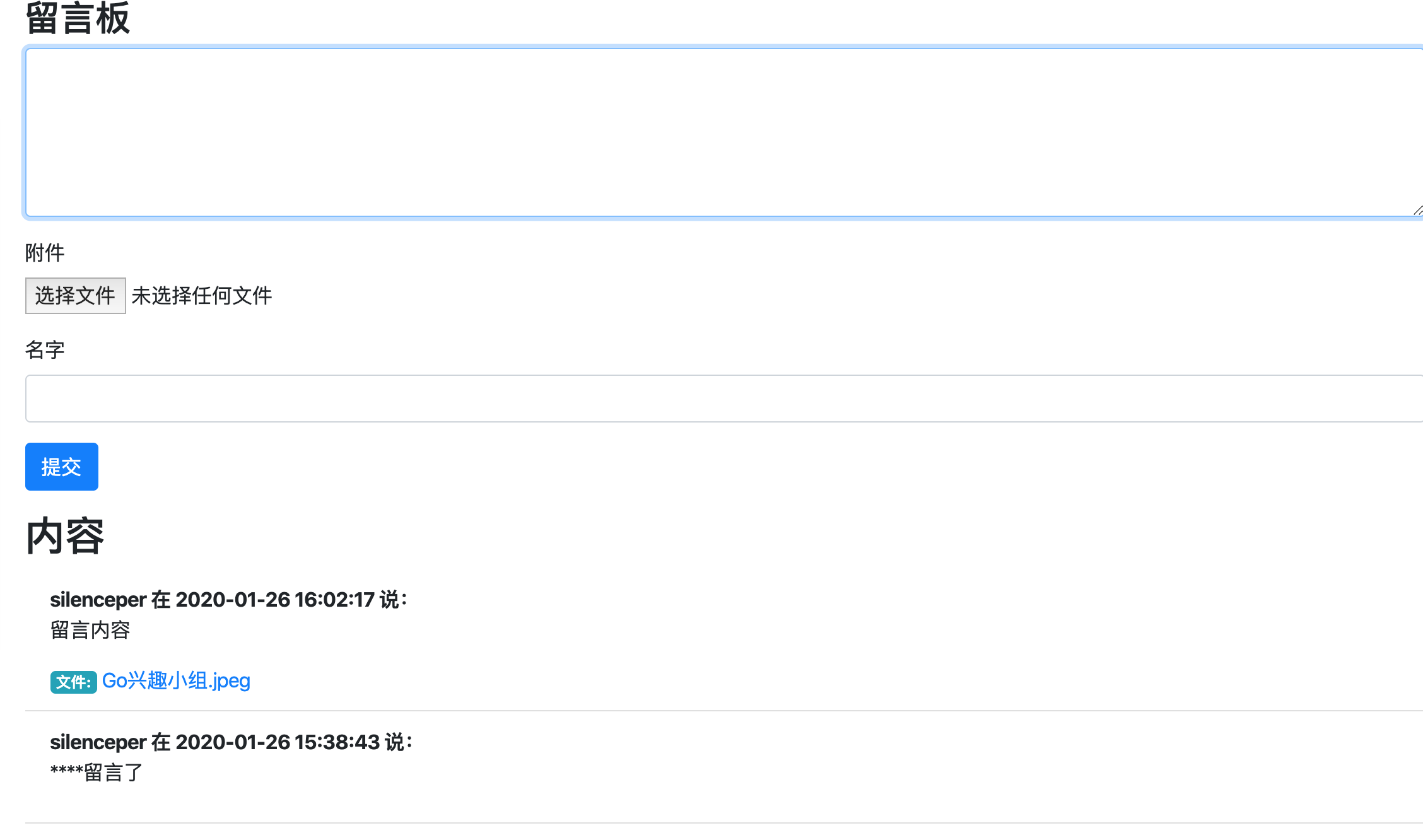
|
||||
|
||||
|
||||
本文中所有代码都上传在 [https://github.com/go-demo/guestbook](https://github.com/go-demo/guestbook)
|
||||
|
||||
7
go.mod
7
go.mod
@@ -5,13 +5,14 @@ go 1.13
|
||||
require (
|
||||
github.com/astaxie/beego v1.7.1
|
||||
github.com/bradfitz/gomemcache v0.0.0-20160117192205-fb1f79c6b65a
|
||||
github.com/fatih/structs v1.1.0
|
||||
github.com/gin-gonic/gin v1.1.4
|
||||
github.com/golang/protobuf v0.0.0-20161117033126-8ee79997227b // indirect
|
||||
github.com/gomodule/redigo v2.0.1-0.20180627144507-2cd21d9966bf+incompatible
|
||||
github.com/kr/pretty v0.1.0
|
||||
github.com/gomodule/redigo v1.8.1
|
||||
github.com/kr/pretty v0.1.0 // indirect
|
||||
github.com/manucorporat/sse v0.0.0-20160126180136-ee05b128a739 // indirect
|
||||
github.com/mattn/go-isatty v0.0.0-20161123143637-30a891c33c7c // indirect
|
||||
github.com/stretchr/testify v1.4.0 // indirect
|
||||
github.com/spf13/cast v1.3.1
|
||||
golang.org/x/crypto v0.0.0-20190308221718-c2843e01d9a2
|
||||
golang.org/x/net v0.0.0-20191125084936-ffdde1057850 // indirect
|
||||
golang.org/x/sync v0.0.0-20190911185100-cd5d95a43a6e // indirect
|
||||
|
||||
14
go.sum
14
go.sum
@@ -4,12 +4,16 @@ github.com/bradfitz/gomemcache v0.0.0-20160117192205-fb1f79c6b65a h1:k5TuEkqEYCR
|
||||
github.com/bradfitz/gomemcache v0.0.0-20160117192205-fb1f79c6b65a/go.mod h1:PmM6Mmwb0LSuEubjR8N7PtNe1KxZLtOUHtbeikc5h60=
|
||||
github.com/davecgh/go-spew v1.1.0 h1:ZDRjVQ15GmhC3fiQ8ni8+OwkZQO4DARzQgrnXU1Liz8=
|
||||
github.com/davecgh/go-spew v1.1.0/go.mod h1:J7Y8YcW2NihsgmVo/mv3lAwl/skON4iLHjSsI+c5H38=
|
||||
github.com/davecgh/go-spew v1.1.1 h1:vj9j/u1bqnvCEfJOwUhtlOARqs3+rkHYY13jYWTU97c=
|
||||
github.com/davecgh/go-spew v1.1.1/go.mod h1:J7Y8YcW2NihsgmVo/mv3lAwl/skON4iLHjSsI+c5H38=
|
||||
github.com/fatih/structs v1.1.0 h1:Q7juDM0QtcnhCpeyLGQKyg4TOIghuNXrkL32pHAUMxo=
|
||||
github.com/fatih/structs v1.1.0/go.mod h1:9NiDSp5zOcgEDl+j00MP/WkGVPOlPRLejGD8Ga6PJ7M=
|
||||
github.com/gin-gonic/gin v1.1.4 h1:XLaCFbU39SSGRQrEeP7Z7mM3lvRqC4vE5tEaVdLDdSE=
|
||||
github.com/gin-gonic/gin v1.1.4/go.mod h1:7cKuhb5qV2ggCFctp2fJQ+ErvciLZrIeoOSOm6mUr7Y=
|
||||
github.com/golang/protobuf v0.0.0-20161117033126-8ee79997227b h1:fE/yi9pibxGEc0gSJuEShcsBXE2d5FW3OudsjE9tKzQ=
|
||||
github.com/golang/protobuf v0.0.0-20161117033126-8ee79997227b/go.mod h1:6lQm79b+lXiMfvg/cZm0SGofjICqVBUtrP5yJMmIC1U=
|
||||
github.com/gomodule/redigo v2.0.1-0.20180627144507-2cd21d9966bf+incompatible h1:QJ4V3LjaRe/6NKoaaj2QzQZcezt5gNXdPv0axxS4VNA=
|
||||
github.com/gomodule/redigo v2.0.1-0.20180627144507-2cd21d9966bf+incompatible/go.mod h1:B4C85qUVwatsJoIUNIfCRsp7qO0iAmpGFZ4EELWSbC4=
|
||||
github.com/gomodule/redigo v1.8.1 h1:Abmo0bI7Xf0IhdIPc7HZQzZcShdnmxeoVuDDtIQp8N8=
|
||||
github.com/gomodule/redigo v1.8.1/go.mod h1:P9dn9mFrCBvWhGE1wpxx6fgq7BAeLBk+UUUzlpkBYO0=
|
||||
github.com/kr/pretty v0.1.0 h1:L/CwN0zerZDmRFUapSPitk6f+Q3+0za1rQkzVuMiMFI=
|
||||
github.com/kr/pretty v0.1.0/go.mod h1:dAy3ld7l9f0ibDNOQOHHMYYIIbhfbHSm3C4ZsoJORNo=
|
||||
github.com/kr/pty v1.1.1/go.mod h1:pFQYn66WHrOpPYNljwOMqo10TkYh1fy3cYio2l3bCsQ=
|
||||
@@ -21,9 +25,11 @@ github.com/mattn/go-isatty v0.0.0-20161123143637-30a891c33c7c h1:YHHK/dEmr2Jo1cW
|
||||
github.com/mattn/go-isatty v0.0.0-20161123143637-30a891c33c7c/go.mod h1:M+lRXTBqGeGNdLjl/ufCoiOlB5xdOkqRJdNxMWT7Zi4=
|
||||
github.com/pmezard/go-difflib v1.0.0 h1:4DBwDE0NGyQoBHbLQYPwSUPoCMWR5BEzIk/f1lZbAQM=
|
||||
github.com/pmezard/go-difflib v1.0.0/go.mod h1:iKH77koFhYxTK1pcRnkKkqfTogsbg7gZNVY4sRDYZ/4=
|
||||
github.com/spf13/cast v1.3.1 h1:nFm6S0SMdyzrzcmThSipiEubIDy8WEXKNZ0UOgiRpng=
|
||||
github.com/spf13/cast v1.3.1/go.mod h1:Qx5cxh0v+4UWYiBimWS+eyWzqEqokIECu5etghLkUJE=
|
||||
github.com/stretchr/objx v0.1.0/go.mod h1:HFkY916IF+rwdDfMAkV7OtwuqBVzrE8GR6GFx+wExME=
|
||||
github.com/stretchr/testify v1.4.0 h1:2E4SXV/wtOkTonXsotYi4li6zVWxYlZuYNCXe9XRJyk=
|
||||
github.com/stretchr/testify v1.4.0/go.mod h1:j7eGeouHqKxXV5pUuKE4zz7dFj8WfuZ+81PSLYec5m4=
|
||||
github.com/stretchr/testify v1.2.2/go.mod h1:a8OnRcib4nhh0OaRAV+Yts87kKdq0PP7pXfy6kDkUVs=
|
||||
github.com/stretchr/testify v1.5.1/go.mod h1:5W2xD1RspED5o8YsWQXVCued0rvSQ+mT+I5cxcmMvtA=
|
||||
golang.org/x/crypto v0.0.0-20190308221718-c2843e01d9a2 h1:VklqNMn3ovrHsnt90PveolxSbWFaJdECFbxSq0Mqo2M=
|
||||
golang.org/x/crypto v0.0.0-20190308221718-c2843e01d9a2/go.mod h1:djNgcEr1/C05ACkg1iLfiJU5Ep61QUkGW8qpdssI0+w=
|
||||
golang.org/x/net v0.0.0-20191125084936-ffdde1057850 h1:Vq85/r8R9IdcUHmZ0/nQlUg1v15rzvQ2sHdnZAj/x7s=
|
||||
|
||||
@@ -32,6 +32,7 @@ func NewMaterial(context *context.Context) *Material {
|
||||
type Article struct {
|
||||
Title string `json:"title"`
|
||||
ThumbMediaID string `json:"thumb_media_id"`
|
||||
ThumbURL string `json:"thumb_url"`
|
||||
Author string `json:"author"`
|
||||
Digest string `json:"digest"`
|
||||
ShowCoverPic int `json:"show_cover_pic"`
|
||||
|
||||
@@ -2,36 +2,57 @@ package pay
|
||||
|
||||
import (
|
||||
"fmt"
|
||||
"github.com/fatih/structs"
|
||||
"github.com/silenceper/wechat/util"
|
||||
"github.com/spf13/cast"
|
||||
"reflect"
|
||||
"sort"
|
||||
"strings"
|
||||
)
|
||||
|
||||
// Base 公用参数
|
||||
type Base struct {
|
||||
AppID string `xml:"appid"`
|
||||
MchID string `xml:"mch_id"`
|
||||
NonceStr string `xml:"nonce_str"`
|
||||
Sign string `xml:"sign"`
|
||||
}
|
||||
// doc: https://pay.weixin.qq.com/wiki/doc/api/jsapi.php?chapter=9_7&index=8
|
||||
|
||||
// NotifyResult 下单回调
|
||||
type NotifyResult struct {
|
||||
Base
|
||||
ReturnCode string `xml:"return_code"`
|
||||
ReturnMsg string `xml:"return_msg"`
|
||||
ResultCode string `xml:"result_code"`
|
||||
OpenID string `xml:"openid"`
|
||||
IsSubscribe string `xml:"is_subscribe"`
|
||||
TradeType string `xml:"trade_type"`
|
||||
BankType string `xml:"bank_type"`
|
||||
TotalFee int `xml:"total_fee"`
|
||||
FeeType string `xml:"fee_type"`
|
||||
CashFee int `xml:"cash_fee"`
|
||||
CashFeeType string `xml:"cash_fee_type"`
|
||||
TransactionID string `xml:"transaction_id"`
|
||||
OutTradeNo string `xml:"out_trade_no"`
|
||||
Attach string `xml:"attach"`
|
||||
TimeEnd string `xml:"time_end"`
|
||||
ReturnCode *string `xml:"return_code"`
|
||||
ReturnMsg *string `xml:"return_msg"`
|
||||
|
||||
AppID *string `xml:"appid" json:"appid"`
|
||||
MchID *string `xml:"mch_id"`
|
||||
DeviceInfo *string `xml:"device_info"`
|
||||
NonceStr *string `xml:"nonce_str"`
|
||||
Sign *string `xml:"sign"`
|
||||
SignType *string `xml:"sign_type"`
|
||||
ResultCode *string `xml:"result_code"`
|
||||
ErrCode *string `xml:"err_code"`
|
||||
ErrCodeDes *string `xml:"err_code_des"`
|
||||
OpenID *string `xml:"openid"`
|
||||
IsSubscribe *string `xml:"is_subscribe"`
|
||||
TradeType *string `xml:"trade_type"`
|
||||
BankType *string `xml:"bank_type"`
|
||||
TotalFee *int `xml:"total_fee"`
|
||||
SettlementTotalFee *int `xml:"settlement_total_fee"`
|
||||
FeeType *string `xml:"fee_type"`
|
||||
CashFee *string `xml:"cash_fee"`
|
||||
CashFeeType *string `xml:"cash_fee_type"`
|
||||
CouponFee *int `xml:"coupon_fee"`
|
||||
CouponCount *int `xml:"coupon_count"`
|
||||
|
||||
// coupon_type_$n 这里只声明 3 个,如果有更多的可以自己组合
|
||||
CouponType0 *string `xml:"coupon_type_0"`
|
||||
CouponType1 *string `xml:"coupon_type_1"`
|
||||
CouponType2 *string `xml:"coupon_type_2"`
|
||||
CouponID0 *string `xml:"coupon_id_0"`
|
||||
CouponID1 *string `xml:"coupon_id_1"`
|
||||
CouponID2 *string `xml:"coupon_id_2"`
|
||||
CouponFeed0 *string `xml:"coupon_fee_0"`
|
||||
CouponFeed1 *string `xml:"coupon_fee_1"`
|
||||
CouponFeed2 *string `xml:"coupon_fee_2"`
|
||||
|
||||
TransactionID *string `xml:"transaction_id"`
|
||||
OutTradeNo *string `xml:"out_trade_no"`
|
||||
Attach *string `xml:"attach"`
|
||||
TimeEnd *string `xml:"time_end"`
|
||||
}
|
||||
|
||||
// NotifyResp 消息通知返回
|
||||
@@ -42,46 +63,38 @@ type NotifyResp struct {
|
||||
|
||||
// VerifySign 验签
|
||||
func (pcf *Pay) VerifySign(notifyRes NotifyResult) bool {
|
||||
// 封装map 请求过来的 map
|
||||
resMap := make(map[string]interface{})
|
||||
// base
|
||||
resMap["appid"] = notifyRes.AppID
|
||||
resMap["mch_id"] = notifyRes.MchID
|
||||
resMap["nonce_str"] = notifyRes.NonceStr
|
||||
// NotifyResult
|
||||
resMap["return_code"] = notifyRes.ReturnCode
|
||||
resMap["result_code"] = notifyRes.ResultCode
|
||||
resMap["openid"] = notifyRes.OpenID
|
||||
resMap["is_subscribe"] = notifyRes.IsSubscribe
|
||||
resMap["trade_type"] = notifyRes.TradeType
|
||||
resMap["bank_type"] = notifyRes.BankType
|
||||
resMap["total_fee"] = notifyRes.TotalFee
|
||||
resMap["fee_type"] = notifyRes.FeeType
|
||||
resMap["cash_fee"] = notifyRes.CashFee
|
||||
resMap["transaction_id"] = notifyRes.TransactionID
|
||||
resMap["out_trade_no"] = notifyRes.OutTradeNo
|
||||
resMap["attach"] = notifyRes.Attach
|
||||
resMap["time_end"] = notifyRes.TimeEnd
|
||||
// 支付key
|
||||
// STEP1, 转换 struct 为 map,并对 map keys 做排序
|
||||
resMap := structs.Map(notifyRes)
|
||||
|
||||
sortedKeys := make([]string, 0, len(resMap))
|
||||
for k := range resMap {
|
||||
sortedKeys = append(sortedKeys, k)
|
||||
}
|
||||
sort.Strings(sortedKeys)
|
||||
// STEP2, 对key=value的键值对用&连接起来,略过空值
|
||||
|
||||
// STEP2, 对key=value的键值对用&连接起来,略过空值 & sign
|
||||
var signStrings string
|
||||
for _, k := range sortedKeys {
|
||||
value := fmt.Sprintf("%v", resMap[k])
|
||||
if value != "" {
|
||||
signStrings = signStrings + k + "=" + value + "&"
|
||||
value := fmt.Sprintf("%v", cast.ToString(resMap[k]))
|
||||
if value != "" && strings.ToLower(k) != "sign" {
|
||||
signStrings = signStrings + getTagKeyName(k, ¬ifyRes) + "=" + value + "&"
|
||||
}
|
||||
}
|
||||
|
||||
// STEP3, 在键值对的最后加上key=API_KEY
|
||||
signStrings = signStrings + "key=" + pcf.PayKey
|
||||
|
||||
// STEP4, 进行MD5签名并且将所有字符转为大写.
|
||||
sign := util.MD5Sum(signStrings)
|
||||
if sign != notifyRes.Sign {
|
||||
if sign != *notifyRes.Sign {
|
||||
return false
|
||||
}
|
||||
return true
|
||||
}
|
||||
|
||||
func getTagKeyName(key string, notifyRes *NotifyResult) string {
|
||||
s := reflect.TypeOf(notifyRes).Elem()
|
||||
f, _ := s.FieldByName(key)
|
||||
name := f.Tag.Get("xml")
|
||||
return name
|
||||
}
|
||||
|
||||
Reference in New Issue
Block a user